Toyota Kit: The Core Design System of Toyota Reimagine, Enabling a Cohesive and Scalable Digital Experience
Toyota Kit: The Core Design System of Toyota Reimagine, Enabling a Cohesive and Scalable Digital Experience
Toyota Kit is the foundational design system developed as part of the Toyota Reimagine initiative. It establishes a unified set of components, styles, and guidelines to ensure consistency and scalability across Toyota’s digital ecosystem.
Designed for both designers and content managers, Toyota Kit enables easy content creation and layout management through Sitecore CMS. This system empowers teams to build cohesive, on-brand experiences efficiently and with greater flexibility.
Toyota Kit is the foundational design system developed as part of the Toyota Reimagine initiative. It establishes a unified set of components, styles, and guidelines to ensure consistency and scalability across Toyota’s digital ecosystem.
Designed for both designers and content managers, Toyota Kit enables easy content creation and layout management through Sitecore CMS. This system empowers teams to build cohesive, on-brand experiences efficiently and with greater flexibility.

COMPANY
Toyota Australia (via R/GA)
ROLE
Product / Visual Designer
SCOPE
Design System, Design Governance, Quality Assurance
PERIOD
2024-2025
COMPANY
Toyota Australia (via R/GA)
ROLE
Product / Visual Designer
SCOPE
Design System, Design Governance, Quality Assurance
PERIOD
2024-2025
Disclaimer: This is a high-level project overview. For the full case study or more details, feel free to reach out at olehabib98@gmail.com.

Disclaimer: This is a high-level project overview. For the full case study or more details, feel free to reach out at olehabib98@gmail.com.
Key Challenges
Key Challenges
01
01
How to create components that can flexibly serve dozens of pages while staying consistent?
How to create components that can flexibly serve dozens of pages while staying consistent?
02
02
How might we make components easy for designers, content managers, and developers to use effectively?
How might we make components easy for designers, content managers, and developers to use effectively?
03
03
How to streamline design-to-development handoff while ensuring visual and functional consistency?
How to streamline design-to-development handoff while ensuring visual and functional consistency?
Design Process
Design Process
01
Audit components across Reimagine and other projects
01
Audit components across Reimagine and other projects
02
Evaluate global vs project-specific usage
03
Build master components with variants and properties
04
Define theming, sizing, and responsiveness rules
05
Create documentation for cross-role usage
06
Handover components and conduct QA with developers
07
Review in Chromatic and Storybook for visual and functional
08
Designer create new design proposal if client have a feedback on the build
02
Evaluate global vs project-specific usage
03
Build master components with variants and properties
04
Define theming, sizing, and responsiveness rules
05
Create documentation for cross-role usage
06
Handover components and conduct QA with developers
07
Review in Chromatic and Storybook for visual and functional
08
Provide feedback and approve final components for publication
Key strategy
Key strategy
Empower speed, consistency, and collaboration. By setting clear examples, variant rules, and documentation, design and content work in perfect sync.
Empower speed, consistency, and collaboration. By setting clear examples, variant rules, and documentation, design and content work in perfect sync.
Key Solutions
Key Solutions
01
01
Component Inventory & Classification
Create a comprehensive list of components and define their scope: global or project-specific, ensuring reuse where possible.
02
02
Master Component Creation
Design each component with variants and properties to accommodate multiple use cases and page layouts.
Design each component with variants and properties to accommodate multiple use cases and page layouts.
03
03
Comprehensive Documentation
Provide overview, do’s and don’ts, sizing, responsiveness, theming, usage instructions, and specs for designers, content managers, producers, and developers.
Provide overview, do’s and don’ts, sizing, responsiveness, theming, usage instructions, and specs for designers, content managers, producers, and developers.
04
04
Handoff, Review & Approval
Collaborate with developers through handover, QA, and implementation checks. Review components in Chromatic and Storybook for visual fidelity, responsiveness, and functionality, provide feedback, and approve final components for system-wide use.
COMPONENT EXAMPLES
COMPONENT EXAMPLES
COMPONENT EXAMPLES
A collaboration of
Habib + Eloyse + VD Team
Load Spinner
Load Spinner
The Spinner Load component provides clear visual feedback during short, indeterminate wait times, letting users know the system is actively processing their request. Designed with a smooth looping animation, it maintains a sense of responsiveness without feeling intrusive. This component supports user confidence during transitions and contributes to a seamless, uninterrupted interaction flow across the interface.
The Spinner Load component provides clear visual feedback during short, indeterminate wait times, letting users know the system is actively processing their request. Designed with a smooth looping animation, it maintains a sense of responsiveness without feeling intrusive. This component supports user confidence during transitions and contributes to a seamless, uninterrupted interaction flow across the interface.


Two Column Feature
Two Column Feature
The Two Column Feature presents product or service information using a flexible left-right layout that pairs imagery with content. Each property is designed to support multiple use cases, allowing the image and text to be swapped easily while maintaining visual balance. It adapts automatically on mobile, removing the need for manual layout adjustments from content managers and ensuring consistent structure across pages.
The Two Column Feature presents product or service information using a flexible left-right layout that pairs imagery with content. Each property is designed to support multiple use cases, allowing the image and text to be swapped easily while maintaining visual balance. It adapts automatically on mobile, removing the need for manual layout adjustments from content managers and ensuring consistent structure across pages.


Header
Header
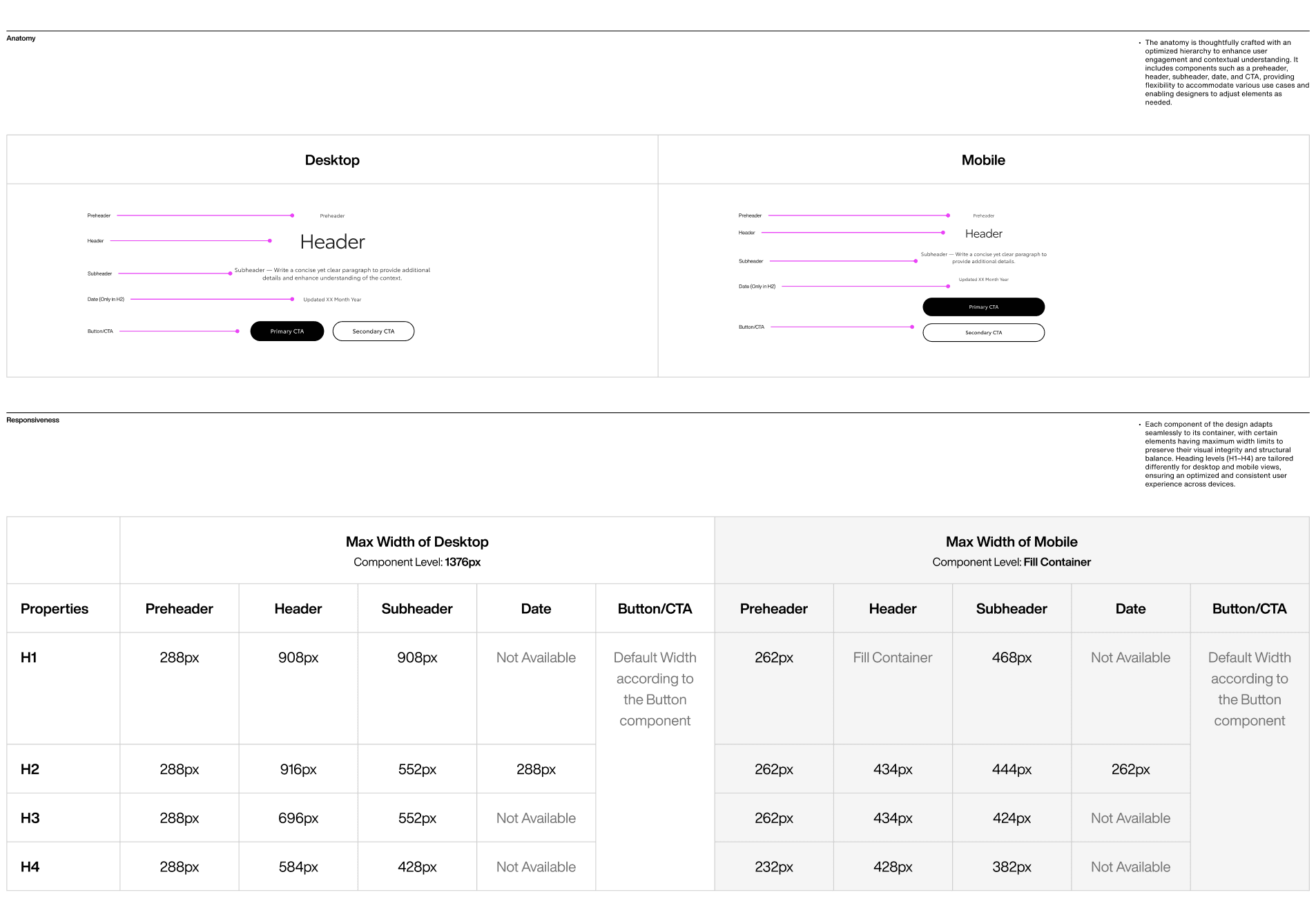
The Header component groups key elements: title, paragraph, CTA, and supporting attributes to clearly introduce content within a section. Designed with semantic levels from H1 to H3, it supports various hierarchies such as hero headers or subsection introductions. With left and center alignment variants, the component offers flexibility while maintaining visual clarity and consistent messaging across different page types.
The Header component groups key elements: title, paragraph, CTA, and supporting attributes to clearly introduce content within a section. Designed with semantic levels from H1 to H3, it supports various hierarchies such as hero headers or subsection introductions. With left and center alignment variants, the component offers flexibility while maintaining visual clarity and consistent messaging across different page types.


Small Button
Small Button
The Small Button is optimized for form-related interactions, matching the height of input fields to create a cohesive and structured layout. It distinguishes secondary or supporting actions from the primary form action, which uses the regular button. This hierarchy helps users identify next steps easily, ensuring clarity between minor interactions and the final confirmation or submission within a form flow.
The Small Button is optimized for form-related interactions, matching the height of input fields to create a cohesive and structured layout. It distinguishes secondary or supporting actions from the primary form action, which uses the regular button. This hierarchy helps users identify next steps easily, ensuring clarity between minor interactions and the final confirmation or submission within a form flow.


Campaign Banner
Campaign Banner
The Campaign Banner extends the Alert Banner into a larger, more attention-driven format tailored for sales and promotional content. With increased size, stronger color emphasis, and optional sticky positioning, it ensures key messages remain visible as users browse. This component helps highlight time-sensitive offers effectively while maintaining alignment with Toyota’s overall visual communication system.
The Campaign Banner extends the Alert Banner into a larger, more attention-driven format tailored for sales and promotional content. With increased size, stronger color emphasis, and optional sticky positioning, it ensures key messages remain visible as users browse. This component helps highlight time-sensitive offers effectively while maintaining alignment with Toyota’s overall visual communication system.


Date Picker
Date Picker
The Date Picker provides an intuitive interface for selecting dates and times within booking or scheduling flows. Designed around an interactive calendar, it reduces input errors and increases efficiency by guiding users through structured selection steps. The component adapts well across devices and aligns with form elements, ensuring a smooth and consistent experience wherever date entry is required.
The Date Picker provides an intuitive interface for selecting dates and times within booking or scheduling flows. Designed around an interactive calendar, it reduces input errors and increases efficiency by guiding users through structured selection steps. The component adapts well across devices and aligns with form elements, ensuring a smooth and consistent experience wherever date entry is required.


Outcome Highlights
Outcome Highlights
Scalable Design System
Scalable Design System
Built a flexible system of components that powers dozens of pages, making future redesigns faster and easier.
Built a flexible system of components that powers dozens of pages, making future redesigns faster and easier.
Faster Page Delivery
Faster Page Delivery
Accelerated page creation and updates, reducing time-to-publish and enabling rapid rollout of web pages.
Accelerated page creation and updates, reducing time-to-publish and enabling rapid rollout of web pages.
Consistent Brand Experience
Consistent Brand Experience
Delivered a unified and polished digital experience across all platforms, reinforcing Toyota’s brand identity.
Delivered a unified and polished digital experience across all platforms, reinforcing Toyota’s brand identity.
Enhanced Team Collaboration
Enhanced Team Collaboration
Streamlined collaboration across design, content, and development, cutting errors and improving project efficiency.
Streamlined collaboration across design, content, and development, cutting errors and improving project efficiency.
Collaborator
Collaborator
Visual Designer (Eloyse)
Producer (Odie)
Dev Team
Here are the other final results after my review and final design touches:
About Me
Project
Service
Testimony
Contact